Install add-ons and plug-ins to your web browser

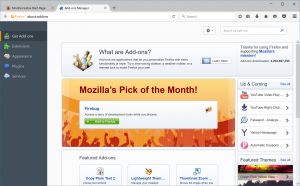
To install a extension or add-ons click the menu Tools and choose Add-ons. The Add-ons Manager tab will open. In the Add-ons Manager tab, select the Get Add-ons panel. To install a featured add-on, click the grey toggle button, which will turn green. To uninstall an add-on you just installed, click the toggle button again.
A plugin is a piece of software that manages Internet content that Firefox is not designed to process. These usually include patented formats for video, audio, online games, presentations, and more. Plugins are created and distributed by other companies. if you acces to a website without pluguin the browser lets you know that you need to install the plugin. The installation of a plugin is simple, go to the web site to download the file when the download is done, you shoud close the browser and go to the folder where you download it. Open the file you downloaded and follow the installer’s instructions.