When received unexpected attachments
The most common way to spread malicious software is through email using attachments. It is important to know the risks that this may entail opening an attachment. That is why you have to follow a few steps before doing so.
- Do not attempt to open any attachment if it does not come from a known sender.
- In case you receive an email from an important institution, check with the institution and confirm that the email is legitimate before opening it.
- If the email is not legitimate, delete it immediately from the inbox and then open the deleted email folder and delete it from there as well.

There are other tips and guidance it is important to be aware of when dealing with suspicious emails and attachments. You may be able to tell if an attachment is legitimate or not by looking at the file extension of the email attachment.
When an email with attachments is received, whether it is legitimate or not to consider what type of extension the file has. A file extension is the three letters that follow the file at the end of the file name. only a few are considered safe. These are GIF, JPG or JPEG, TIF or TIFF, MPG or MPEG, MP3 and WAV. These extensions represent different file types and are the formats that the majority of internet users tend to send as email attachments.
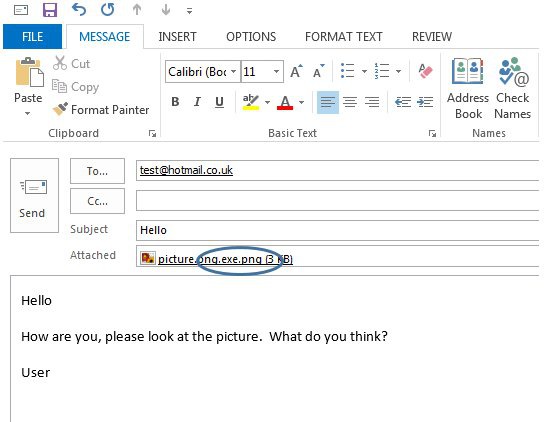
You should also be smart and cautious with files that have double extensions, such as «picture.gif.exe». The only extension that matters is the last one. EXE represents an executable file that will automatically execute the software after running it on the computer. Most likely, anything with an EXE at the end is misleading and an attachment that needs to be deleted.
Below is a picture of a suspicious email that has more than one filename extension. This should be removed from your email systems by deleting it.









Publicar comentario