Enter data with Scanner and operate with them
The entry or reading of data in Java is one of the most important and fundamental concepts when interacting with the user of our program. The entry of data in Java, unlike other languages is a bit complicated and there are different ways to do it, some more complex than others. In this section we will see the easiest way to read data for our Java program using the Scanner class of the java.util library.
How to use Scanner class
To use Scanner in the program we will have to do the following:
1. Write the import
The Scanner class is in the java.util.Scanner package, therefore the instruction must be included at the beginning of the program:
import java.util.Scanner;
2. Create a Scanner object
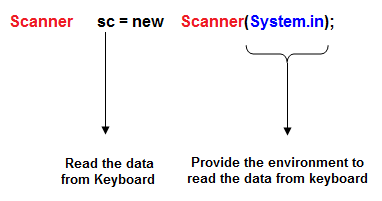
We have to create an object of the Scanner class associated with the input device. If the input device is the keyboard we will write:
Scanner sc = new Scanner(System.in);
The sc object associated with the keyboard represented by System.in has been created. Once this is done we can read data by keyboard.
Reading examples:
To read we can use the method nextXxx() where Xxx indicates in type, for example nextInt() to read an integer, nextDouble() to read a double, etc.
1. Example of keyboard reading of a whole number:
int n;

System.out.print("Enter a whole number: ");

n = sc.nextInt();
2. Example of reading a double type number:
double x;

System.out.print("Enter double type number: ");

x = sc.nextDouble();
3. Example of reading a String of characters:
String s;

System.out.print("Enter text: ");

s = sc.nextLine();
Operating the Java Scanner class
In short, we can say that when characters are introduced by keyboard, the Scanner object takes the entire introduced string and divides it into elements called tokens.
The default character that serves as the token separator is the blank space.
For example, if we enter: «This is an example, reading data.»
Scanner divides the string into the following tokens:
This
is
an
example,
reading
data.
If we introduce the String: «12 20.001 Luke w»
The tokens that are created are:
12
20.001
Luke
w
Then, using the methods provided by the Scanner class, you can access those tokens and work with them in the program.
The Scanner class provides other methods, some of the most used methods are:
| METHOD | DESCRIPTION |
| nextXxx() | Returns the following token as a basic type. Xxx is the type. For example, nextInt() to read an integer, nextDouble to read a double, etc. |
| next() | Returns the next token as a String. |
| nextLine() | Returns the entire line as a String. Remove the end \n from the buffer. |
| hasNext() | Returns a boolean Indicates whether or not there is a next token to read. |
| hasNextXxx() | Returns a boolean Indicates whether or not there is a next token of the type specified in Xxx, for example hasNextDouble(). |
| useDelimiter(String) | Set a new token delimiter. |
How to clean the input buffer in Java
When a program is read by keyboard numerical data and character or String type data, we must bear in mind that when entering the data and pressing enter we are also entering the intro in the input buffer.
If a 5 is entered with the instruction:
n = sc.nextInt ();
Assign to n the value 5 but the intro remains in the buffer. If now it is requested that a chain of characters be entered by keyboard with the instruction:
System.out.print ("Enter your name:");

name = sc.nextLine (); // read a String
The nextLine() method extracts all the characters from the input buffer until it reaches an intro and eliminates the intro from the buffer. Therefore the first character before the name will be an intro and the program will remove the name.
Solution:
The input buffer should be cleaned if character data is to be read after the reading of numeric data.
The simplest way to clean the input buffer in Java is to execute the instruction sc.nextLine(); after each numerical reading.
How to operate with data entered by Scanner object
Let’s see how to make the user enter values that will be assigned to the variables. Our first example will add two numbers, which on this occasion will be entered by the user through the keyboard.
// Sum3.java
// Example of the variables entered by the user
// Operate with data entered by standard input, Aitor Alcaniz

import java.util.Scanner;

class Sum3 {

    public static void main( String args[] ) {

        Scanner keyboard= new Scanner(System.in);
        System.out.print( "Enter the first number: " );
        int firstNumber = keyboard.nextInt();
        System.out.print( "Enter the second number: " );
        int secondNumber = keyboard.nextInt();

        System.out.print( "The sum is: " );
        System.out.println( firstNumber+secondNumber );
    }
}
In this program there are several new things:
- We are going to use a feature that is not something basic to the language. That’s why we tell you that we want to import new features. In our case, it is a Scanner object, which will allow us to analyze texts: import java.util.Scanner;
- Our Scanner object will take data from the system input System.in, so we declare it with: Scanner keyboard = new Scanner (System.in); The name «keyboard» could be «input» or any other and is a variable that contains the Scanner object.
- Thereafter, every time we call .nextInt() a number will be read from the standard system input that is the keyboard: int firstNumber = keyboard.nextInt ();
This program will write something like:
Enter the first number: 4
Enter the second number: 6
Its sum is: 10
It is usual to declare the variables at the beginning of the program, before the real logic that solves the problem begins. If several variables are going to save data of the same type, all of them can be declared at the same time, separated by commas, as in the following example:
// Sum3b.java
// Two declared variables at the same time
// Operate with data entered by standard input, Aitor Alcaniz

import java.util.Scanner;

class Sum3b {

    public static void main( String args[] ) {

        Scanner keyboard;
        int firstNumber, secondNumber;

        keyboard = new Scanner(System.in);

        System.out.print( "Enter the first number: " );
        firstNumber = keyboard.nextInt();

        System.out.print( "Enter the second number: " );
        secondNumber = keyboard.nextInt();

        System.out.print( "The sum is: " );
        System.out.println( firstNumber + secondNumber);
    }
}
As the way to assimilate all this is to prove it, here are several proposed exercises:
1: Create a program that calculates and displays the product of two integers that the user enters.
// Exercise1.java
// Operate with data entered by standard input, Aitor Alcaniz

import java.util.Scanner;

class  Exercise1 {

    public static void main( String args[] ) {

        Scanner keyboard;
        int firstNumber, secondNumber;

        keyboard = new Scanner(System.in);

        System.out.print( "Enter the first number: " );
        firstNumber = keyboard.nextInt();

        System.out.print( "Enter the second number: " );
        secondNumber = keyboard.nextInt();

        System.out.print( "The product is: " );
        System.out.println( firstNumber * secondNumber);
    }
}
2: Create a program that calculates and shows the division of two integers entered by the user.
// Exercise2.java
// Operate with data entered by standard input, Aitor Alcaniz

import java.util.Scanner;

class  Exercise2 {

    public static void main( String args[] ) {

        Scanner keyboard;
        int firstNumber, secondNumber;

        keyboard = new Scanner(System.in);

        System.out.print( "Enter the first number: " );
        firstNumber = keyboard.nextInt();

        System.out.print( "Enter the second number: " );
        secondNumber = keyboard.nextInt();

        System.out.print( "The division is: " );
        System.out.println( firstNumber / secondNumber);
    }
}
3: Create a program that calculates and shows the rest of the division of two integers that the user enters.
// Exercise3.java
// Operate with data entered by standard input, Aitor Alcaniz

import java.util.Scanner;

class  Exercise3 {

    public static void main( String args[] ) {

        Scanner keyboard;
        int firstNumber, secondNumber;

        keyboard = new Scanner(System.in);

        System.out.print( "Enter the first number: " );
        firstNumber = keyboard.nextInt();

        System.out.print( "Enter the second number: " );
        secondNumber = keyboard.nextInt();

        System.out.print( "The rest of the division is: " );
        System.out.println( firstNumber % secondNumber);
    }
}
4: Create a program that asks the user for a length in miles (for example, 3) and calculate its equivalence in meters (1 mile = 1609 m).
// Exercise4.java
// Operate with data entered by standard input, Aitor Alcaniz

import java.util.Scanner;

class  Exercise4 {

    public static void main( String args[] ) {

        Scanner keyboard;
        int milesNumber;

        keyboard = new Scanner(System.in);

        System.out.print( "Enter the number of miles: " );
        milesNumber = keyboard.nextInt();

        System.out.print( milesNumber+" miles in meters is: "+(1609*milesNumber));
    }
}
5: Create a program that asks the user for a temperature in degrees Celsius and calculate (and show) how many degrees Fahrenheit equals (F = 9 * C / 5 + 32).
// Exercise5.java
// Operate with data entered by standard input, Aitor Alcaniz

import java.util.Scanner;

class  Exercise5 {

    public static void main( String args[] ) {

        Scanner keyboard;
        int c;

        keyboard = new Scanner(System.in);

        System.out.print( "Enter the temperature in degrees: " );
        c= keyboard.nextInt();

        System.out.print( "The temperature in Fahrenheit is: "+( 9 * c / 5 + 32));
    }
}
6: Create a program that asks the user the base and height of a triangle and show its surface (S = B * A / 2).
// Exercise6.java
// Operate with data entered by standard input, Aitor Alcaniz

import java.util.Scanner;

class  Exercise6 {

    public static void main( String args[] ) {

        Scanner keyboard;
        int base , height;

        keyboard = new Scanner(System.in);

        System.out.print( "Enter the base of a triangle: " );
        base = keyboard.nextInt();

        System.out.print( "Enter the height of a triangle: " );
        height = keyboard.nextInt();

        System.out.print( "The surface of the triangle is: "+(base * height / 2) );
    }
}








Publicar comentario