Relationships between tables

The relationship represents an association established between common fields (columns) in two tables. There are three types of relationships, which are: one to one, one to several and several to several. In the Database the relations of several to several can not be expressed, so they must be remodeled.
One to One
It appears when a record in table A can only be related to 1 record in table B. This model appears in exclusive relationships, such as Countries-Flags, since each country has a single official flag, and each flag can only be belong to a country; another example would be car license plates and chassis number.
In the follow image we have an One to One relationship between a Student and Address, so each Student has an Address and each Address is from a Student.

One to Many
In this case, a record of table A can be related to several of table B. It is the most common and used type, and there are numerous cases; for example, home with people living in it, name of company with its workers, suppliers with products that serve …
In this example we have a relationship between a Student and Phone, so in this relationship one Student should have one or more Phones and one Phone belongs to one and only to one Student.

Many to Many
It is given if several records of A can be related to several of B and vice versa. It is perhaps the least usual formally, an example is to have two tables, one of actors and another of films, since the usual thing is that each actor has worked in several films, and that these are formed by several actors.

Many to many relationships:
Rules:
An Actor can do in multiple films at once.
A Movie can have many Actors.
This means that an Actor has many Movies, and a Movie has many Actors.
We can’t add the primary key of one table into the other, or both, because this only stores a single relationship, and we need many.
We can’t do this:
[Identification of the Actor] [Movie ID] [Name of the Actor]
              1                  2,5,8       Johnny Depp
              2                  3,5,4       Vin Diesel
This means that we have a column to store multiple values, which is very difficult to maintain and consult.
Neither could we have many columns for Movie ID values, since this would be complicated and would create a limit on the number of relationships.
[Actor ID] [Movie ID 1] [Movie ID 2] [Movie ID 3] [Actor Name]
    1           2            5            8        Johnny Depp
    2           3            5            4        Vin Diesel
To solve this problem we use a concept called join table.
A join table is a table that is between the other two tables of a many-to-many relationship. Its purpose is to store a record for each of the combinations of these other two tables. basically it is a relation of 3 weak two entities that are Actor and Movie and a strong Actor_Movies that is the relation that unites them.
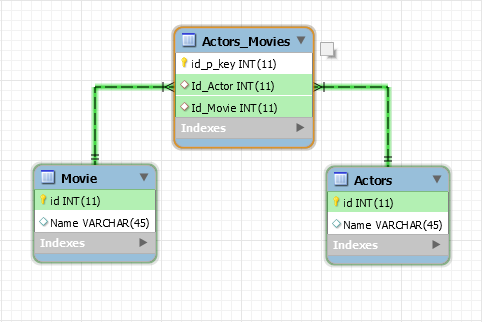
We must create a new table called Actor_Movies that stores two columns: one for each of the main keys of the other table.
[ID row][ID of Actor] [ID Movie]
   1          1           2
   2          1           5
   3          1           8
   4          2           3
   5          2           5
   6          2           4
This table stores the primary keys of each actor and movie combination.
The implementation in SQL of this table:
CREATE TABLE Actor_Movies
(
id int AUTO_INCREMENT PRIMARY KEY,
id_actor VARCHAR(50) NOT NULL,
id_movie VARCHAR(50) NOT NULL,
FOREIGN KEY (id_actor) REFERENCES Actor(id_actor),
FOREIGN KEY (id_movie ) REFERENCES Movie(id_movie )
);
The Actor and Movie tables would be this way:
Actor’s table:
[Actor ID] [Actor's Name]
     1       Johnny Depp
     2       Vin Diesel
The implementation in SQL of this table:
CREATE TABLE Actor
(
id_actor int AUTO_INCREMENT PRIMARY KEY,
name_actor VARCHAR(50) NOT NULL
);
Movie ‘s table:
[Movie ID] [Movie's Name]
     2      Movie_Name_N0
     5      Movie_Name_N1
     8      Movie_Name_N2
     4      Movie_Name_N3
     3      Movie_Name_N4
The implementation in SQL of this table:
CREATE TABLE Movie
(
id_movie int AUTO_INCREMENT PRIMARY KEY,
name_movie VARCHAR(50) NOT NULL
);









Publicar comentario