Infrastructure needed to support an Thin Client
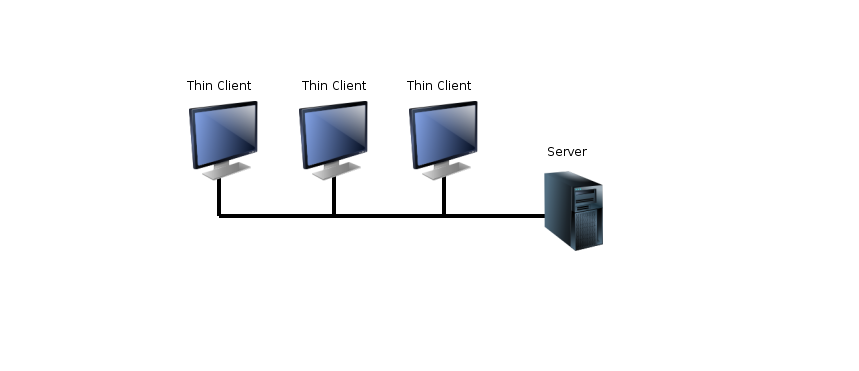
Supporting an internet client is possible through the use of a range of servers. It is possible to have Thin clients, clients that are almost completely reliant upon servers and Thick clients, clients that are highly capable devices on their own but do occasionally use servers for some processes such as emails. In this Assessment Criteria we will focus upon the infrastructure you would need on the internet to support a Thin client in its popular daily applications, such as surfing the World Wide Web, sending email, opening office documents and saving and retrieving files.
When a Thin client is connected internet we need to get the more specialised servers and their software up and running to support the Thin client in its daily tasks. There will be a familiar theme running through the identification and explanations below and that is the use of third party servers. While it is possible to setup your own server, install an operating system of your choice and install middleware onto the operating system it is far easier to use free third party alternatives which are available for all of the daily tasks outlined earlier. For example, I could choose to install Linux onto a server and then place an email middleware application onto the server but I would then be paying rent for a server and have to manage any issues that arise myself.

Browsers are small applications that allow you to send HTTP requests to web servers, allowing you to download webpages and view web content. Therefore, your Thin client is going to need a browser installed to be able to surf the web and the infrastructure must contain web servers to store the webpages the user is going to want to view. A web server has one purpose, storing the webpages of a website so that a user can request the pages and the server can process that request and send the required page to the user. Without this server supporting the client there would be no surfing the web as webpages could not be requested and downloaded.
Thin client is going to need a basic end user software application to retrieve email from a server. Microsoft Outlook, Mozilla Thunderbird or Gmail would all be acceptable choices but if this truly was a Thin client is every sense of the word you would want to use the browser version of these applications rather than the installed version as you would be using precious resources on your Thin client installing such an end user application. The browser version would be just as easily accessible via a URI and would not require anything other than your browser being installed. The actual email server would be setup and maintained by a third party company such a Microsoft and Google and only login credentials would be needed after you’ve made an account with the company. This would then allow you to send and receive emails as well as use other features built into the email clients such as arranging emails into folders, spam filtering and calendar features.
:max_bytes(150000):strip_icc()/google_docs_logo_and_icon-56a4010a5f9b58b7d0d4e6b2.jpg "Google Docs")
A Thin client is going to struggle if you have to install an entire end user application suite such as Microsoft Office. Either it won’t be possible to install or it will use a lot of your resources to do so. Therefore, third party companies will offer cloud computing infrastructure to support your Thin client on the internet with cloud based solutions such as Office Online and Google Docs. Both of these are online applications with similar functionality to end user applications installed directly onto your device, but they are purely online with data being processed on the server and a simple interface being shown to you via your browser.
/cdn.vox-cdn.com/uploads/chorus_image/image/45663996/onedrivestock.0.jpg "OneDrive")
Finally, a Thin client is going to need support via the internet in the form of a file server. Again, these will be offered by third party companies for free in the form of applications such as OneDrive (Microsoft), iCloud (Apple) and Google Drive (Google). The storing of your files will not be on your device but will be sent via the internet to a separate server which will store your files. You may then access this server to either store more files or retrieve your previously saved ones. Without this infrastructure your Thin client is going to struggle as you will quickly overcome your device resources.
OneDrive is built directly into modern Windows Operating Systems and can be accessed as if it were a folder on your system. This makes saving to the cloud identical to saving on your device and is therefore relatively simple and user friendly to even novice PC users.
Basic Infrastructure of Thin client
In order to support a thin client it is essential to have an internet connection and an operating system with a web browser.
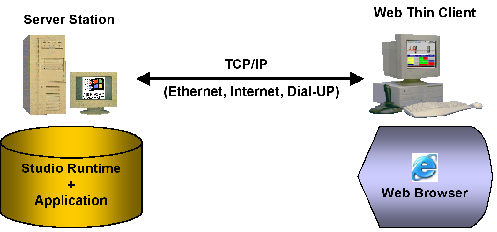
The server will take care of the storage of the web pages that the client wants to consult since without a web server could not consult the web pages. To not use many resources you can choose to use third-party companies offering cloud computing services with cloud-based solutions such as Office Online or Google Docs these web applications do not need installation and are accessible directly with the browser. You can also choose to use file servers in the cloud for free as the services offered by OneDrive (Microsoft), iCloud (Apple) and Google Drive (Google). It is also advisable to use web-based emails not to slow down the infrastructure with facilities.










Publicar comentario