Hello World in Java
This first program will be limited to writing the text «Hello World!» on the screen. First, we will see how this program is, then we will comment a bit on the orders that form it and finally we will see how the program works.
Our first program will be:
// HelloWorld.java
// Application HelloWorld Example

class HelloWorld{
    public static void main( String args[] ) {
        System.out.print( "Hello World!" );
    }
}
Two details to consider before moving on:
- It may seem complicated to be a first program. If Java is your first programming language, you have to assume it: Java is like that, it does not pretend that the simple is simple, but the complicated is not terrible. That is why large projects will be easier to maintain and less prone to errors than with older languages such as BASIC or C, but the basic programs will seem unnecessarily complex.
- It is important to respect the case and the uppercase. The fact of writing «system» instead of «System» will cause us to get a compilation error.
Understanding This First Program
The only part of the program that we need to understand for now is the central line. Therefore, we are going to analyze it from the inside out, leaving some details in the air.
The only part of the program that we need to understand for now is the central line that is the one that actually writes on the screen.
System.out.print ("Hello World!");
The order that is responsible for writing is «print». It is an output order (out) of our system (System), and we must always write it using those three words, one after another and separated by points:
System.out.print
What we want to write will be indicated in parentheses. If it is a text that should appear as such, it will also be enclosed in double quotes.
The semicolon that appears at the end of that line is also important: every order in Java must end with a semicolon.
Therefore, the way to write a text will be:
System.out.print ("Hello World!");
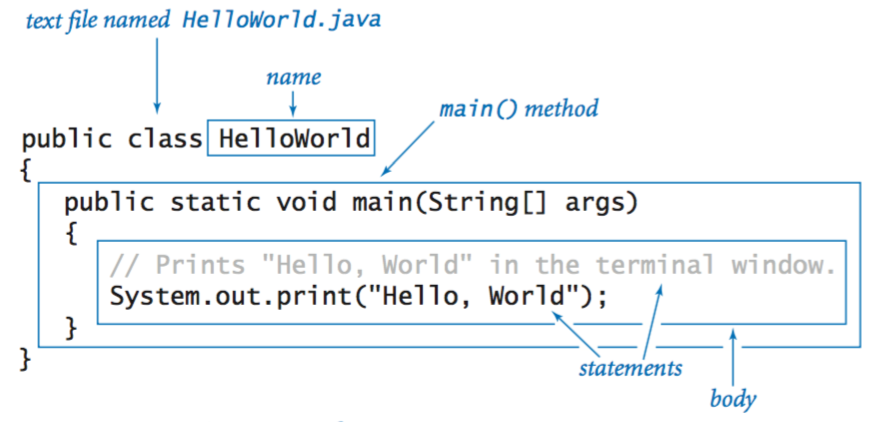
The body of the program Hello World
In all programs created using Java, there must be a block called «main», which represents the body of the program. This block will always start with the words «public static void» and end with «(String args [])»:
public static void main (String args [])
The content of each block of the program must be detailed between braces. Therefore, the line «print» appears after «main» and surrounded by keys:
public static void main (String args []) {
   System.out.print ("Hello World!");
}
These keys of beginning and end of a block could be written in any point of the program before the content of the block and after its content. It is usual to place the opening key at the end of the order that opens the block, and the closing key just below the word that opens the block, as seen in the previous example.
The name of the program
Each Java program must «have a name». This name can be a single word or several words together, and even contain numerical figures, but it must start with a letter and it must not have blank spaces. The name must be indicated after the word «class» and then the block that will delimit the entire program will be opened, with keys:
class HelloWorld{
   public static void main (String args []) {
       System.out.print ("Hello World!");
   }
}
The program must be saved in a file, whose name matches exactly what we have written after the word «class», even with the same case. This file name will end with «.java». Thus, for our first example program, the file should be called «HelloWorld.java».
Comments
The first two lines of the program are:
// HelloWorld.java
// Application Hello Example world
These lines, which start with a double slash (//) are comments, our computer ignores them, as if we had not written anything.
If we want a comment to occupy several lines, or only a piece of a line, instead of reaching the end of the line, we can precede each line with a double bar, as in the previous example, or indicate where we want to start with «/ *» and where we want to end with «*/»:
/* This is the
 HelloWorld
 Sample Application */
Various sentences
If we want to «do several things», we can write several sentences inside «main». For example, we could write the word «Hello» first, then a space and then «World!» using three different «print» commands:
// HelloWorld.java
// Second application HelloWorld Example

class HelloWorld {
    public static void main (String args []) {
        System.out.print ("Hello");
        System.out.print ("");
        System.out.print ("World!");
    }
}
Write and advance line
Sometimes we do not want to write everything on the same line. To advance the line after writing something, just use «println» instead of «print»:
// HelloWorld.java
// Third application HelloWorld example

class HelloWorld {
  public static void main (String args []) {
      System.out.println("Hello ...");
      System.out.println("World!");
  }
}








Publicar comentario