Variables and basic mathematical operations in Java
In programming, a variable is a memory space reserved for storing a value that corresponds to a type of data supported by the programming language. A variable is represented and used through a label (a name) that a programmer assigns or that is already predefined.
Variables
We can perform mathematical operations if we indicate them without quotes. Thus, the computer will know that you should not write something that is in quotes «», but should try to discover its meaning:
// Sum1.java
// Example of sum with prefixed data
// Introduction to Variables in Java, Aitor Alcaniz

class Sum1 {

    public static void main( String args[] ) {

        System.out.println("The sum of 76 y 37 is:" ); //Show a warning message
        System.out.println(76+37 ); //The result of the operation
    }
}
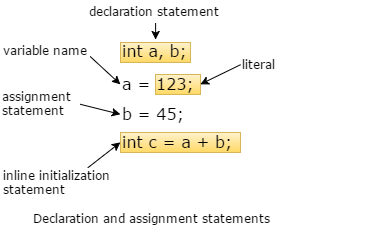
Normally the data handled by our program will be the result of some mathematical operation or of any other type, from data entered by the user, read from a file or obtained from the Internet … Therefore, we will need a space in the Ram memory where to store temporary values and results of operations.
In almost any programming language we can reserve Ram memory, and assign them a name with which to access the stored values. This is what is known as variables.
For example, if we want the user to enter two numbers and the computer calculates the sum of both numbers and display it on the screen, we would need the space to store at least those two initial numbers. It would not be essential to reserve space also for the sum, because we can show it on the screen at the same moment we calculate it. The steps to be taken would be the following:
- Warn the user that we want you to enter a number.
- Store that value that the user enters in a memory space called firstNumber.
- Ask the user to enter another number.
- Store the new value in another memory space called «secondNumber».
- Show on the screen the result of adding «firstNumber» and «secondNumber».
Well, in this program we would be using two variables called «firstNumber» and «secondNumber». Each one of them would be used to access a memory space, which will be able to store a number.
To avoid wasting our computer’s memory, the memory space that needs to be «reserved» can be optimized according to how large the number can be (the number of figures), or according to the precision we need for that number (amount of decimals). Therefore, we have different types of variables available.
For example, if we are going to handle whole numbers of a maximum of 9 digits, we would be interested in the type of data called «int», this word is the abbreviation of «integer». This type of data consumes a memory space of 4 bytes. If we do not need to store data as large as numbers less than 10,000, we can use the data type called «short», which occupies half the space.
Now let’s see a program that adds two integers and shows the result on the screen:
// Sum2.java
// Example of sum with variables
// Introduction to Variables in Java, Aitor Alcaniz

class Sum2 {

    public static void main( String args[] ) {

        int firstNumber= 76; // Two integers with preset values
        int secondNumber= 37;

        System.out.println("The sum of 76 y 37 is:"); //Show a warning message
        System.out.println(firstNumber+secondNumber); // The result of the operation
    }
}
As you can see, the way to declare a variable is by first detailing the type of data that can be stored («int») and then the name that we will give the variable. In addition, an initial value can optionally be indicated.
We could think about improving the previous program so that the numbers to add are not prefixed, but the user is asked.
Proposed Exercise 1: Create a Java program that writes the product of two preset numbers on the screen.
hint: the symbol of multiplication is the asterisk, «*».
// ProposedExercise1.java
// Example of product with variables
// Introduction to Variables in Java, Aitor Alcaniz

class ProposedExercise1 {

    public static void main( String args[] ) {

        int firstNumber= 6; // Two integers with preset values
        int secondNumber = 2;

        System.out.println("The product of 6 y 2 is:"); //Show a warning message
        System.out.println(firstNumber*secondNumber); // The result of the operation
    }
}
Basic Mathematical Operations
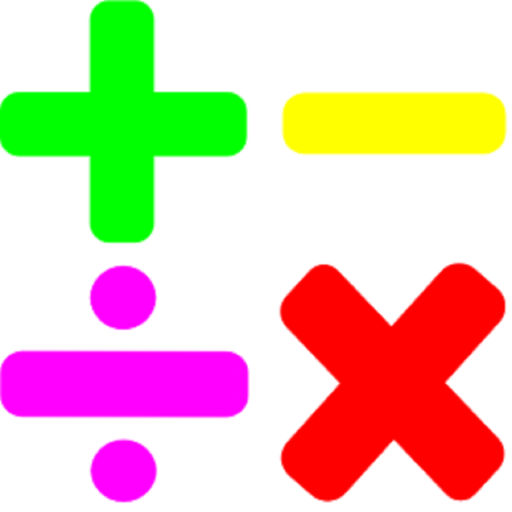
There are several mathematical operations that are frequent. We will see how to express them in Java, as well as another less usual operation.
The ones we will use most often are:
| Math operation | Symbol |
|
Sum |
+ |
|
Subtraction |
– |
|
Multiplication |
* |
| Division |
/ |
|
Rest of the division |
% |
We have seen an example of how to calculate the sum of two numbers; the other operations would be used in a similar way. The only less usual operation is the rest of the division. For example, if we divide 14 by 3, we get 4 as a quotient and 2 as rest, so that the result of 14% 3 would be 2.
Proposed Exercise 2: Create a program that shows the division of two preset numbers.
// ProposedExercise2.java
// Example of division with variables
// Introduction to Variables in Java, Aitor Alcaniz

class ProposedExercise2 {

    public static void main( String args[] ) {

        int firstNumber= 6; // Two integers with preset values
        int secondNumber = 2;

        System.out.println("The division of 6 y 2 is:"); //Show a warning message
        System.out.println(firstNumber/secondNumber); // The result of the operation
    }
}
Proposed Exercise 3: Create a program that shows the rest of dividing 100 by 30.
// ProposedExercisee.java
// Example of rest of division with variables
// Introduction to Variables in Java, Aitor Alcaniz

class ProposedExercise3 {

    public static void main( String args[] ) {

        int firstNumber= 6; // Two integers with preset values
        int secondNumber = 2;

        System.out.println("The rest of division of 6 y 2 is:"); //Show a warning message
        System.out.println(firstNumber%secondNumber); // The result of the operation
    }
}







Publicar comentario